
Rent Secure Laptops for Corporate & Business Requirements
Renting a laptop is one of those decisions that makes complete sense on paper. You get a capable machine without the upfront cost, you're not stuck with outdated hardware two years down the line, and it works brilliantly for short-term projects, events, or that one client assignment that needs a slightly better spec than your regular device. But there's a question that doesn't get asked enough before someone signs the rental agreement: what happens to your data once you're working on a machine that belonged to someone else before you, and will belong to someone else after?
It's a fair concern. A rented laptop has a history you can't always see: previous users, previous files, sometimes leftover software you didn't ask for. That doesn't mean renting is risky by default; it just means you need to treat security as part of the setup, not an afterthought.
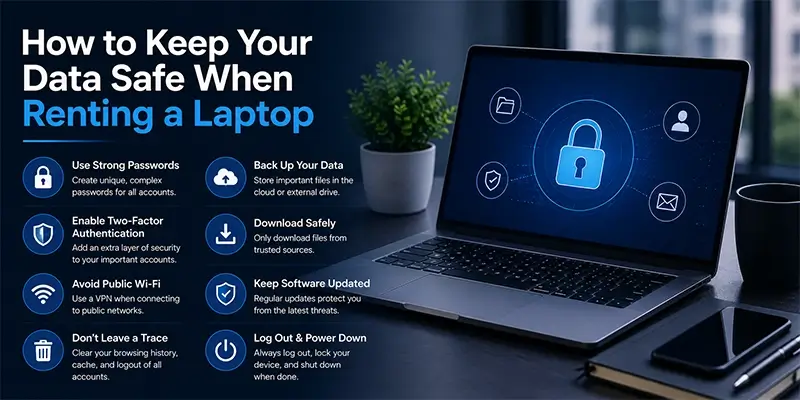
Here are 12 things to do before, during, and after your rental period.
Ask the Provider About Their Data Wiping Policy
Before you even sign anything, ask how the rental company handles devices between customers. A serious provider will reformat the machine, wipe the drive properly, and reinstall the operating system fresh for every new rental. If you get a vague answer or nobody seems too sure, that's worth noting. You're trusting this machine with your work, and it should come to you clean, not just "looking" clean.
Check That the OS and Software Are Updated
An outdated operating system is basically an open door for anyone looking to exploit known vulnerabilities. Before you start using the laptop, check for pending Windows or macOS updates and install them. The same goes for any pre-installed software, browsers especially. It takes a few minutes and closes off a lot of avenues attackers rely on.
Create Your Own User Account
If the laptop comes set up under a generic or shared account, create a fresh user profile for yourself rather than working inside someone else's login. This keeps your files, browser history, and saved passwords separate from anything already on the machine, and makes it far easier to clean up completely once the rental period ends.
Turn On Disk Encryption
Most modern laptops support built-in encryption: BitLocker on Windows, FileVault on Mac. Switching this on means that even if the laptop is lost, stolen, or ends up in the wrong hands somehow, whoever has it can't simply read your files off the drive. It's a setting you turn on once and then forget about, which is exactly how good security should work.
Set a Strong, Unique Password
This sounds obvious, but it's skipped more often than you'd think. Don't reuse a password you've used elsewhere, and don't go with anything predictable. A password manager can generate and store something strong without you having to remember it, which removes the temptation to fall back on "Laptop123."
Install Basic Antivirus and Anti-Malware Protection
Even a well-maintained rental laptop benefits from having its own antivirus software running, especially if you're downloading files, opening email attachments, or connecting to different networks over the rental period. It doesn't need to be anything elaborate; a reliable antivirus with real-time scanning covers most of what you need.
Avoid Saving Sensitive Data Locally
Where possible, work off cloud storage rather than saving important files directly onto the laptop's hard drive. Google Drive, OneDrive, or whatever your organization uses works fine for this. It means that if anything goes wrong with the device, or you simply forget to delete something before returning it, your data isn't sitting on hardware that isn't yours.
Be Careful on Public and Shared Wi-Fi
If you're using the rented laptop at a co-working space, a hotel, or an event venue, be cautious about the network you connect to. Public Wi-Fi networks are common entry points for attackers looking to intercept data. A VPN adds a solid layer of protection here, and it's worth setting one up before you head anywhere with unpredictable network security.
Turn Off File Sharing When Not Needed
Laptops often come with file-sharing features enabled by default, which is fine on a home network but risky anywhere else. Switch this off unless you specifically need it, particularly when you're connected to a network you don't control.
Log Out and Clear Your Data Before Returning the Device
Before the laptop goes back, log out of every account, clear your browser history and saved passwords, and delete any files or folders you created. Don't assume the rental company will handle this for you; take five minutes at the end of your rental period to do it yourself. It's the single easiest thing to forget and the most important one to remember.
Back Up Your Work Regularly
Rented equipment, however well maintained, is still equipment, and things occasionally go wrong. Get into the habit of backing up your work as you go, whether that's to the cloud or an external drive, so a hardware hiccup never turns into a lost project.
Rent From a Provider You Actually Trust
At the end of the day, a lot of this comes down to who you're renting from. A it rental provider that maintains its equipment properly, wipes devices between customers, and can answer your security questions clearly is going to make this entire process a lot less stressful. At A1 IT Rental, every laptop is checked, cleaned, and reset before it reaches you, so you're not starting from an unknown.
Frequently Asked Question's
Is it actually safe to rent a laptop for business use?
Yes, yes, as long as you rent from a provider that follows proper data wiping and device maintenance practices, and you take basic precautions like setting your own password and avoiding local storage of sensitive files. The risk isn't in renting itself; it's in skipping these steps.
Can someone access my data after I return the rented laptop?
If you've logged out of your accounts, cleared your browser data, and deleted your files before returning it, there's very little left for anyone to access. A trustworthy rental provider will also wipe the device again before handing it to the next customer.
Should I install my own antivirus software on a rented laptop?
It's a good idea, especially if you'll be using the laptop for more than a few days. Even if the machine came with some protection already installed, having software you trust and can update yourself gives you an extra layer of control.
What's the biggest mistake people make with data security on rented laptops?
Probably assuming the laptop is automatically "clean" just because it looks new or was handed over by a professional company. It's always worth doing your own basic checks, updates, encryption, and a fresh user account, rather than taking that for granted.
Empowering IT Businesses One Step at a Time
transforma Support team tiveinvolve asseyour current ancial gize grantsbvisualize strategic ediarey.